The easy part
Creating distribution lists in bulk is quite simple.
Just a CSV file:
| |
And for-each loop
| |
Result:
| Name | DisplayName | GroupType | PrimarySmtpAddress |
|---|---|---|---|
| Fancy Group | Fancy Group | Universal, SecurityEnabled | [email protected] |
| Another Fancy Group | Another Fancy Group | Universal, SecurityEnabled | [email protected] |
| Not That Fancy Group | Not That Fancy Group | Universal, SecurityEnabled | [email protected] |
But updating msExchExtensionAttribute is different
A below won’t work as there is no such command under Set-DistributionGroup.
| |
For this matter we must use Set-ADGroup but it accepts these for Identity parameter:
- A distinguished name
- A GUID (objectGUID)
- A security identifier (objectSid)
- A SAM account name (sAMAccountName)
Since Active Directory adds random numbers to the sAMAccountName for uniqueness, we cannot reliably query by the DL “name”:
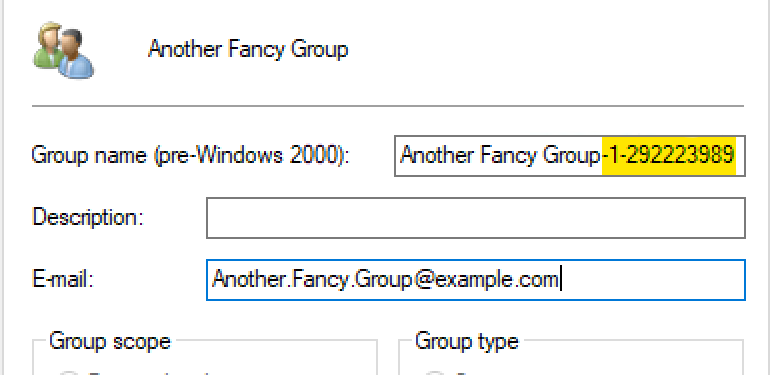
Example: ‘Another Fancy Group’ becomes ‘Another Fancy Group-1-292223989’
A proper command, for the Another Fancy Group is:
| |
We can also use filter and pipeline:
| |
What about bulk update?
For multiple groups, we can import a CSV file for data input, query objects by mail attribute and update these accordingly in loop.
| |
We can filter for any other property - as long as it’s uniqe (and covered in a CSV). Just update script’s line 7.
Clearing the Attribute
To remove the value from msExchExtensionAttribute20:
Single group:
| |
Bulk clear from CSV:
| |
Summary
This is a hybrid/on-premises scenario - less common now days, but still relevant for organizations running Exchange hybrid or syncing on-prem AD to Entra ID.